 Firemacs
Kazu Yamamoto
- An extension to add Emacs’s editing features to Firefox
- You can also enjoy “less”-like motions in non-input elements
- Since v5.0, Firemacs is a WebExtension for Firefox 140 and later
- Official download
Key Bindings
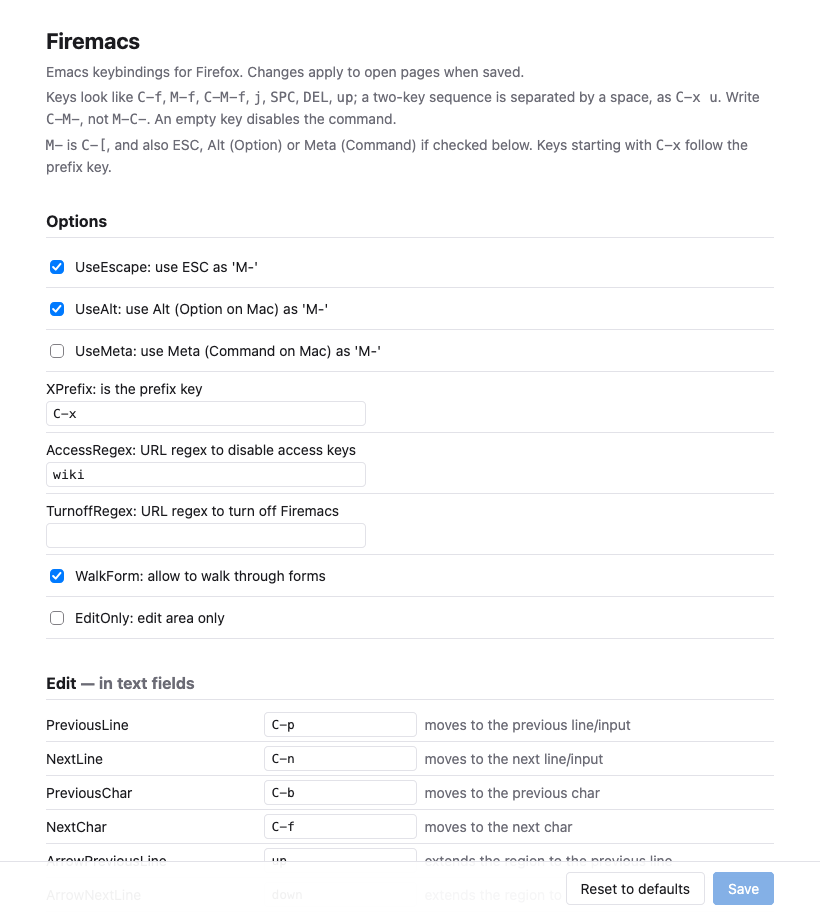
- You can browse and change the commands on the options page. To open it, right-click the Firemacs button on the toolbar, or use about:addons.
M-meansESCorC-[. Alt (Option on Mac) can also be used. Meta (Command on Mac) can be used if enabled on the options page.- To disable a command, remove its key characters
- Clicking the Firemacs button on the toolbar turns Firemacs on and off
Tips
- Incremental search (
C-s/C-r) and the tab list (C-xb)- They use a minibuffer at the bottom of the page. You can type with an input method there.
- Turning off Firemacs on some sites
- Set a regular expression matching their URLs to TurnoffRegex on the options page.
- Problems specific to Windows and Linux
- Firefox keeps
Ctrl+NandCtrl+Wfor itself, soC-nandC-wdo not work. Bind the commands to other keys if necessary. The options page marks such keys.
- Firefox keeps
- Limitations of extensions
- Firemacs does not work on pages where Firefox allows no extensions, such as about: pages and addons.mozilla.org.
C-xl,C-xg,C-xC-fand the completion menus of the URL bar are not available.
Git repository
Git repository is available on github. See ChangeLog.md for the history.
Copyright
Firemacs is distributed under the BSD 3-Clause license (Copyright (c) 2026, Internet Initiative Japan Inc.). You may use and modify firemacs. But if you want to request a new feature, you should give the author a bottle of good wine. :-)
The early versions of Firemacs was implemented based on mozless. I would thank the author of mozless.
The icon was drawn by Mr. Ohkouchi. Thanks!